
Connect anything
with an API. Keep nothing.
SentraBridge moves records between your agency's systems, databases, maps and files, on a schedule or the moment they change. Records pass through in memory and are never stored.
- Pass-through: no stored records
- See the data at every step
- Our cloud or your servers
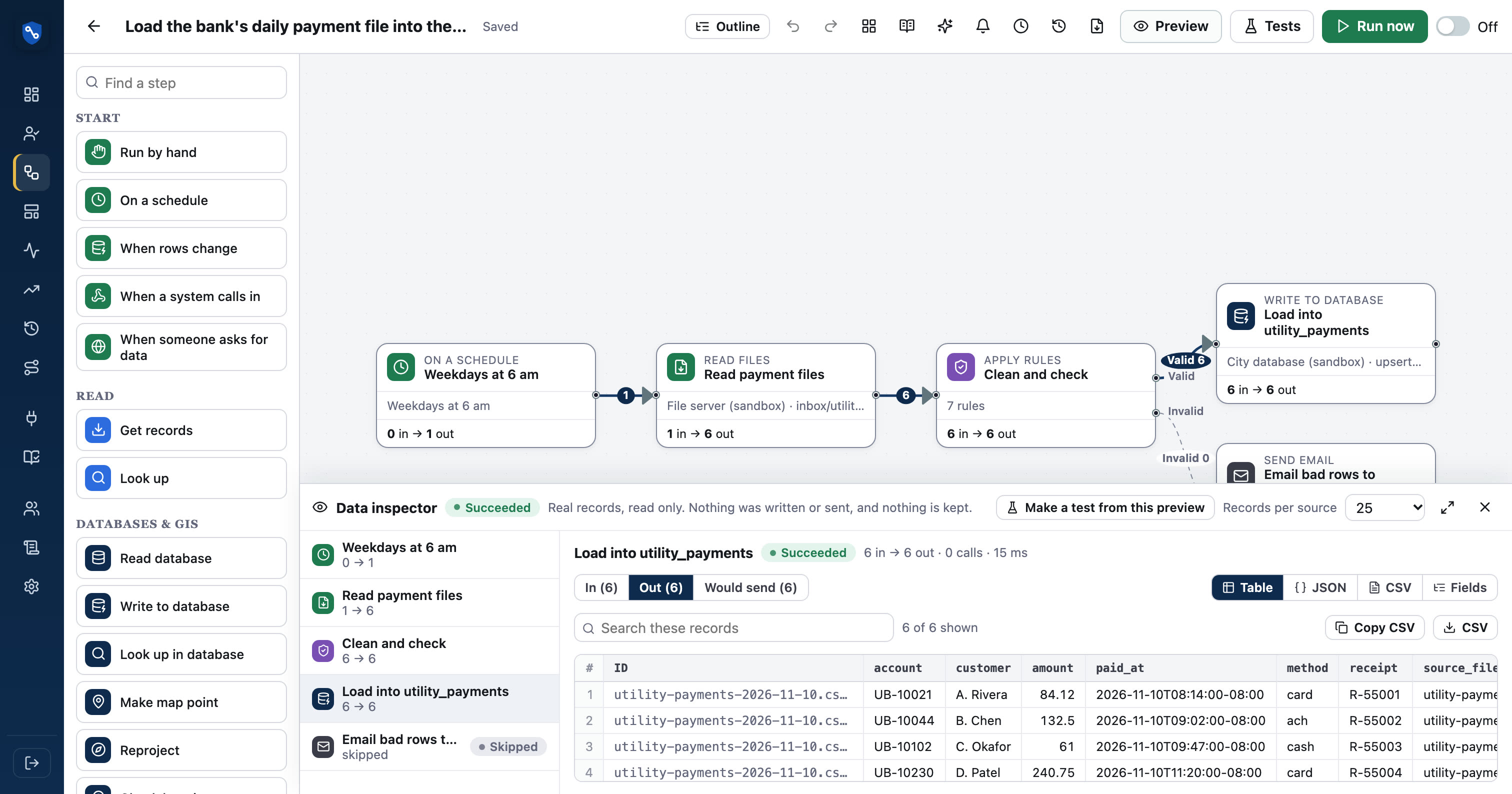
 Sentra 311Our products
 CivicCAOur products
 Sentra SchedulerOur products
 SentraQueueOur products
- AccelaPermitting & land use
- OpenGovPermitting & land use
- Tyler EnerGovPermitting & land use
- LaserficheDocuments & signatures
- ArcGISMaps & GIS
- SalesforceCRM & customer service
- ServiceNowService requests & work orders
- CityworksService requests & work orders
- SQL ServerDatabases
- PostgreSQLDatabases
- SFTPFiles & transfers
- Microsoft 365Office & spreadsheets
- SocrataOpen data & public info
- DocuSignDocuments & signatures
One flow, start to finish. Under a minute.
From two systems to one flow, in an afternoon.
Every SentraBridge integration is a flow you can see. Here's the whole path.
- 01ConnectSystems, databases, maps, files, or an OpenAPI file
- 02DrawRead, change, check, decide, write
- 03InspectReal records on every wire; nothing written
- 04RunBy hand, schedule, webhook or row change
- 05WatchCounts and IDs per run; replay failures
Your records go from one system to the other. Not to us.
SentraBridge reads records into memory, changes them, delivers them, and drops them when the run ends. No copy to breach, retain or produce under a public-records request, and nothing extra for a data-sharing agreement.
Draw the flow. 42 step types.
Build integrations on a canvas instead of in code: read records, change and check them, decide, then write them somewhere else. Branches, rules, lookups, summaries and sub-flows are all boxes you can see.
- Start by hand, on a schedule, by webhook or when rows change
- Autosave, undo, tidy layout and YAML export
- AI drafts a flow from a sentence; you review it
See the data before it's sent.
Like FME's inspector: record counts on every wire, and a click shows the records as a table, JSON, CSV or a field summary. Preview reads real records and never writes.
- 5, 25 or 100 records per source
- Valid and Invalid outputs side by side
- Download what you see as CSV
| account | amount | paid_on | problem |
|---|---|---|---|
| 40-118-22 | 86.40 | 2026-11-09 | No account match |
| 112.00 | 2026-11-09 | Account is required | |
| 40-771-05 | -12.00 | 11/09/26 | Amount must be positive |
Pre-built where it matters. Any API where it doesn't.
Pre-built connectors know each system's records, fields, paging and sign-in. Plain APIs need an address and a key, and any OpenAPI or Swagger file becomes a connector.
- 43 pre-built connectors, 9 plain APIs
- SQL Server, PostgreSQL/PostGIS and MySQL both ways
- SFTP, SharePoint, S3 and Azure Blob for files
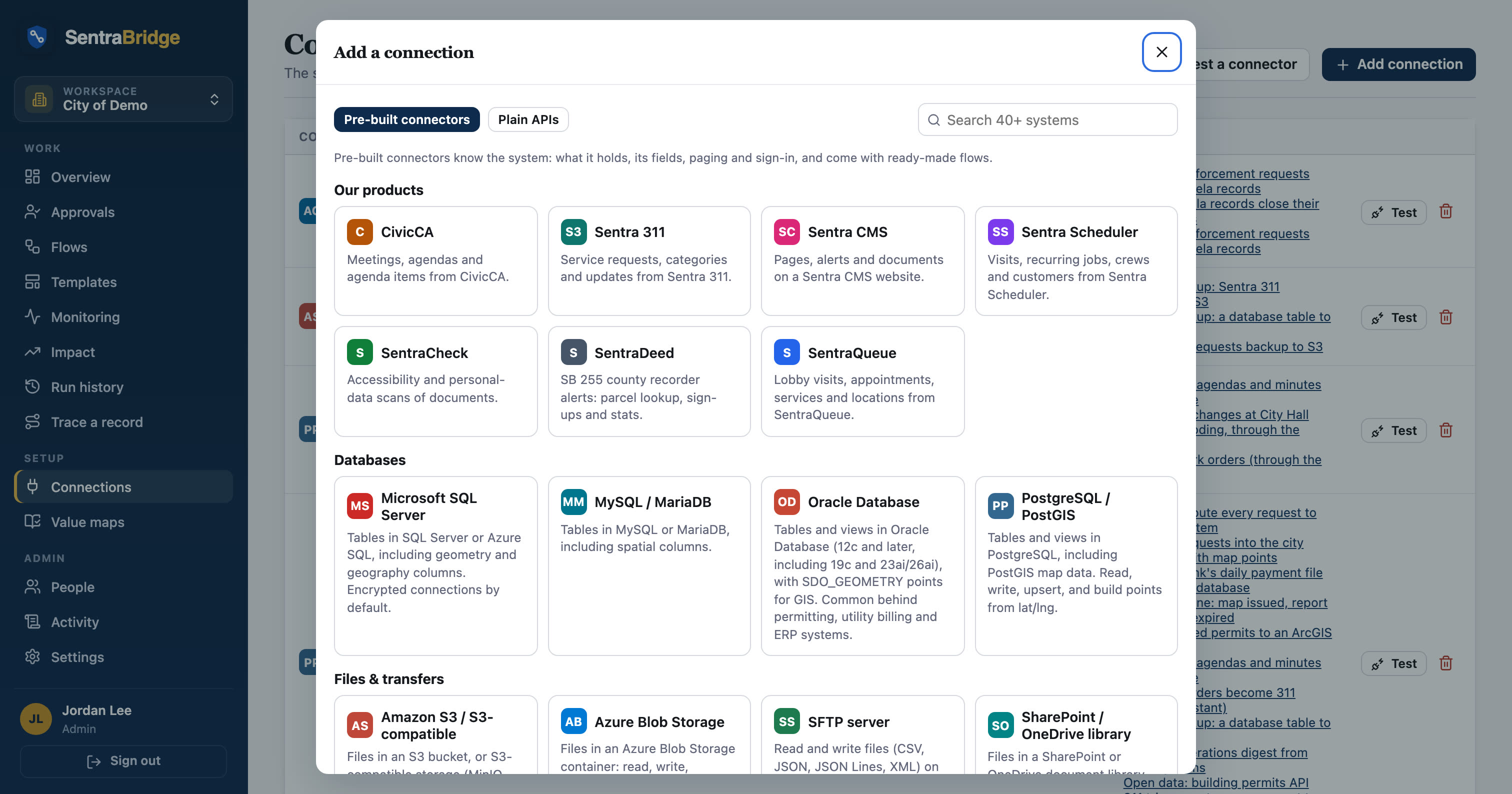
Know what ran. Fix what didn't.
Every run keeps counts, timings and record IDs, never contents. Failures email the people you choose; replay reads failed records again from the source. Trace any record across every flow it touched.
- Data-health alerts: no records, volume swings, late runs
- Version history, and promotion from Test to Production
- Approvals pause a flow for a person
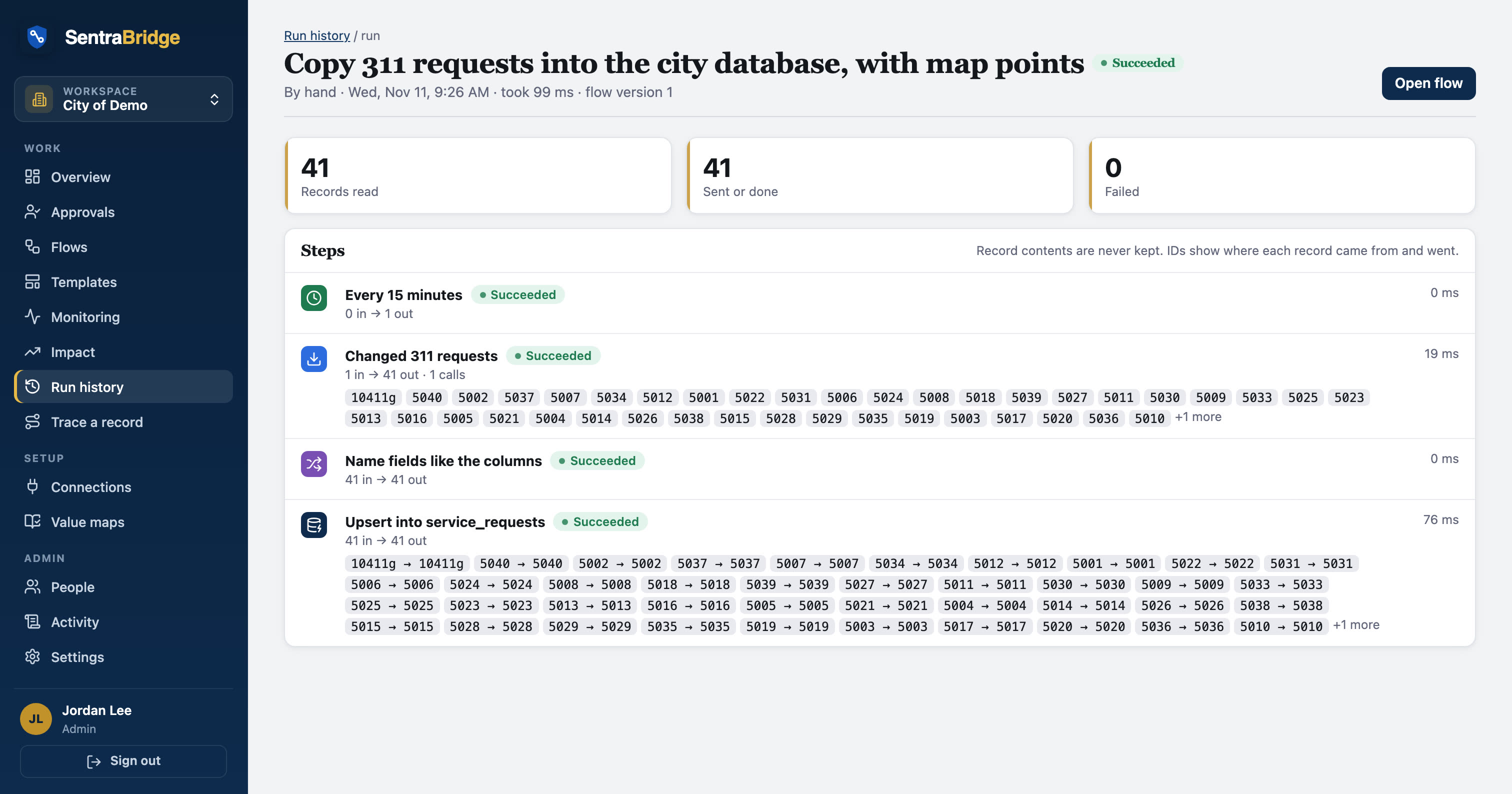
Real flows, drawn from real templates.
These diagrams are generated from the templates that ship with SentraBridge. Open one to see every step explained.
File CivicCA agendas and minutes in Laserfiche
Every hour, files each newly published CivicCA agenda and set of minutes in the city's Laserfiche repository, in the folder for that board, with…
SFTP server → PostgreSQL / PostGISLoad the bank's daily payment file into the city database
Every morning, reads new payment CSV files from the bank's SFTP folder, cleans and checks them, loads them into a database table, and archives the…
PostgreSQL / PostGIS → Esri ArcGIS feature layer → SFTP serverPermit pipeline: map issued, report finaled, file expired
Nightly, reads changed permits with a SQL query, cleans and checks them, then puts issued permits on the ArcGIS map, emails building a total of…
The integrations cities ask for most.
311 ↔ permitting
Sentra 311 with Accela or OpenGov, both ways
Learn more →Records management
CivicCA and Accela into Laserfiche
Learn more →Agendas to the website
CivicCA meetings onto your site
Learn more →GIS publishing
Permits, cases and requests onto ArcGIS
Learn more →Payment & finance files
Bank files into the finance database
Learn more →Open data publishing
Permits and requests to your portal
Learn more →Utility billing
Payments, billing exports, lobby follow-up
Learn more →Code enforcement
Complaints, cases and the map
Learn more →Emergency & weather alerts
NWS alerts to the website and channels
Learn more →Public works & field crews
Requests to crew schedules and back
Learn more →Operations reporting
Digests and summaries from many systems
Learn more →CRM & service desk
Salesforce, ServiceNow, Zendesk and 311
Learn more →Built for agencies, and the teams that serve them.
Each city, county or district gets its own workspace. Vendors and IT providers who serve many agencies run one workspace per client, with shared templates.
Built for public agencies, not adapted for them.
Never stores records
Records exist in memory only while a flow runs. Run history keeps counts, timings and IDs.
Learn more →Encrypted everywhere
HTTPS to APIs, TLS to databases, SSH with pinned host keys for files. Secrets encrypted at rest.
Learn more →Hosted or self-hosted
CSP-hosted on US-based cloud infrastructure, or on your own servers, even air-gapped.
Learn more →Roles and single sign-on
Viewer, builder and admin roles per workspace. Sign in with Microsoft or Google.
Learn more →Every change on record
Activity log, flow versions you can compare and restore, and lineage by record ID.
Learn more →People where it counts
Approval steps pause a flow until a person says yes. IDs only while it waits.
Learn more →Practical guides for city integrations.
Where did this record go? Tracing a record across systems
When an auditor, a resident or a records request asks what happened to one record, integrations are often a blind spot. How to trace a record by ID across every flow, without keeping its contents.
Read article →MCP for city IT: what the Model Context Protocol means for your systems
The Model Context Protocol lets AI assistants use tools in other systems. What it is in plain terms, where it helps city IT, and the access controls to insist on before connecting anything.
Read article →Value maps: the code tables behind clean integrations
One system says Public Works, another wants PW. Value maps translate codes between systems in one place, so every flow agrees and nothing is quietly mistranslated.
Read article →See your own systems connected.
We'll set up a workspace with your systems in a sandbox and build your first flow with you.