
Why your integrations shouldn't keep a copy of resident data
Most integration tools quietly keep a copy of every record they move. For a city, that copy is a liability. Here is what pass-through integration means and why it matters.
Every integration moves records from one system to another. The question most cities never ask is what happens to those records along the way. Many integration tools write each record to a staging table, a message queue or a log before delivering it. Over months, that becomes a full third copy of your residents' data.
Nobody planned that copy. It isn't in your records retention schedule, your data-sharing agreements or your breach response plan. But it exists, and it holds names, addresses, phone numbers and complaint details.
Where the hidden copies live
When you evaluate any integration approach, look for these places where data tends to collect:
- Staging tables that hold records between the read and the write.
- Queues that carry whole records from one worker to another.
- Request and response logs that save the body of every API call, often for debugging.
- Retry stores that keep a failed record so it can be sent again later.
- Exports and spreadsheets created by scripts and left on a shared drive.
Each one is reasonable on its own. Together they create a system that remembers everything it ever moved.
Why the copy is a problem for a public agency
It can be breached
A copy of data is an attack surface. If the integration platform holds two years of 311 requests, permit applicants and utility payments, it is worth breaking into. The safest copy of resident data is the one that doesn't exist.
It can be requested
Records held by or for your agency may be subject to public-records law. A copy sitting in an integration log is one more place your clerk may have to search, review and redact when a request comes in.
It has to be retained, or deliberately destroyed
Your retention schedule says how long permit and payment records are kept, and in which system. A forgotten copy follows no schedule at all. Either it is kept forever, or someone has to prove it was destroyed.
It complicates agreements
When a vendor holds a copy, your data-sharing agreements, security questionnaires and insurance reviews have to cover it. When the vendor holds nothing, those conversations get much shorter.
What pass-through looks like in practice
A pass-through integration reads records into memory, changes and checks them, delivers them, and drops them when the run ends. Your source and destination stay the systems of record.
- 01ReadRecords come in over an encrypted connection
- 02Change and checkIn memory, during the run
- 03DeliverWritten to the destination system
- 04Log metadataCounts, timings and record IDs only
That raises fair questions. Here is how each one is answered without keeping data:
- How do you know what happened? The run history keeps counts, timings, the record IDs on each side, HTTP status and redacted error text. Never field values.
- How do you retry a failure? Replay reads the failed record again from the source by its ID, instead of re-sending a stored copy. If the source is down, the run is marked failed and tried later.
- How do you detect changes? By comparing IDs and "last updated" times, not by keeping old copies to compare against.
- How do you debug? By previewing the flow on a few real records, shown on screen and never saved.
"But we need the data for reporting"
Sometimes a copy is exactly what you want: a reporting database, a data warehouse or an open-data portal. That's fine, as long as it's a deliberate destination you own, with its own retention rules. The difference is between choosing to put records somewhere and having an integration tool keep them by accident.
Questions to ask before you sign
Whether you build, buy or hire someone to script it, ask:
- Where are records stored between the read and the write, if anywhere?
- Do logs include request or response bodies? For how long?
- How does a retry work? Does it re-send a stored copy?
- What does a backup of the integration platform contain?
- Can we see the run history for a real run, and what fields it holds?
How SentraBridge handles it
SentraBridge was designed around this rule from the start. Records pass through in memory, encrypted in transit, and are dropped when the run ends. The queue job carries only the run ID. Webhook flows run inside the request. Preview and the data inspector read a few real records to show each step, but never write or keep anything.
What SentraBridge does keep is what it needs to work: connection settings, field maps, and encrypted credentials. You can read more on the security page, or see what a run's history looks like in monitoring.
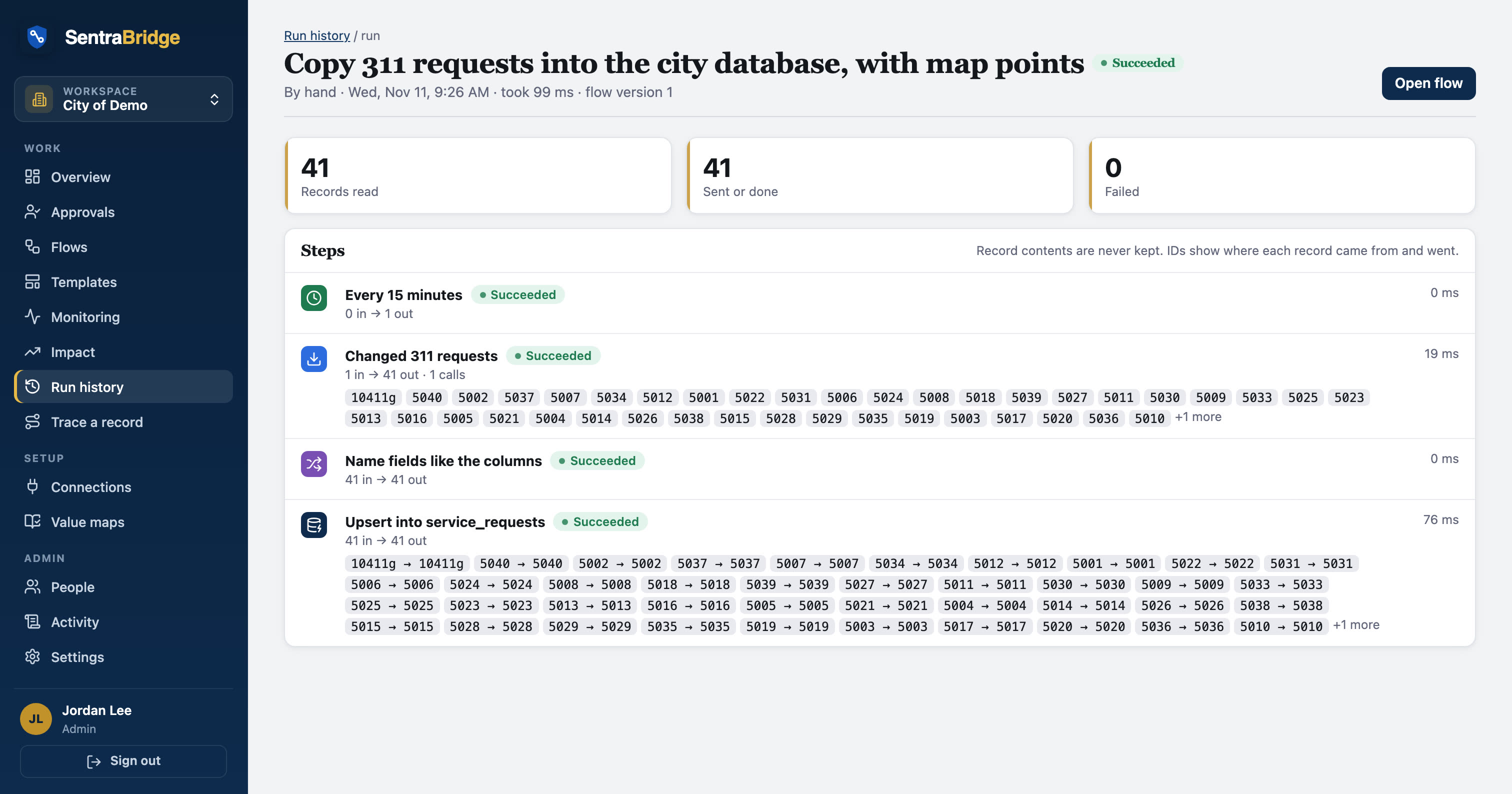
The result is an integration your records manager, your IT director and your counsel can all live with: the data moves, and nothing extra is left behind.