
Where did this record go? Tracing a record across systems
When an auditor, a resident or a records request asks what happened to one record, integrations are often a blind spot. How to trace a record by ID across every flow, without keeping its contents.
A resident calls: "I reported this pothole three weeks ago. Did anyone ever get it?" The 311 request is closed. But did it reach the crew's scheduling system? Did a work order get created? Did it go to the map?
When records move between systems automatically, those questions get hard. Each system knows its own part. The integration in the middle often knows nothing, or keeps logs no one can search.
Why lineage matters for a public agency
Tracing a record's path is called lineage. For a city it comes up more often than you might think:
- Resident questions: "where is my request?"
- Audits: showing a payment in the bank file reached the finance database, once.
- Public-records requests: describing how a record was handled and shared.
- Troubleshooting: a permit is missing from the map; was it ever sent?
The tempting answer, and why it's wrong
The easy way to answer "what happened to this record?" is to log every record in full as it passes through. Then you can look anything up.
But a full log is a full copy. It's another database of resident names, addresses, phone numbers and payment details, which you now have to secure, retain under your schedule, and potentially produce. It turns the integration platform into a system of record nobody meant to create.
IDs are enough
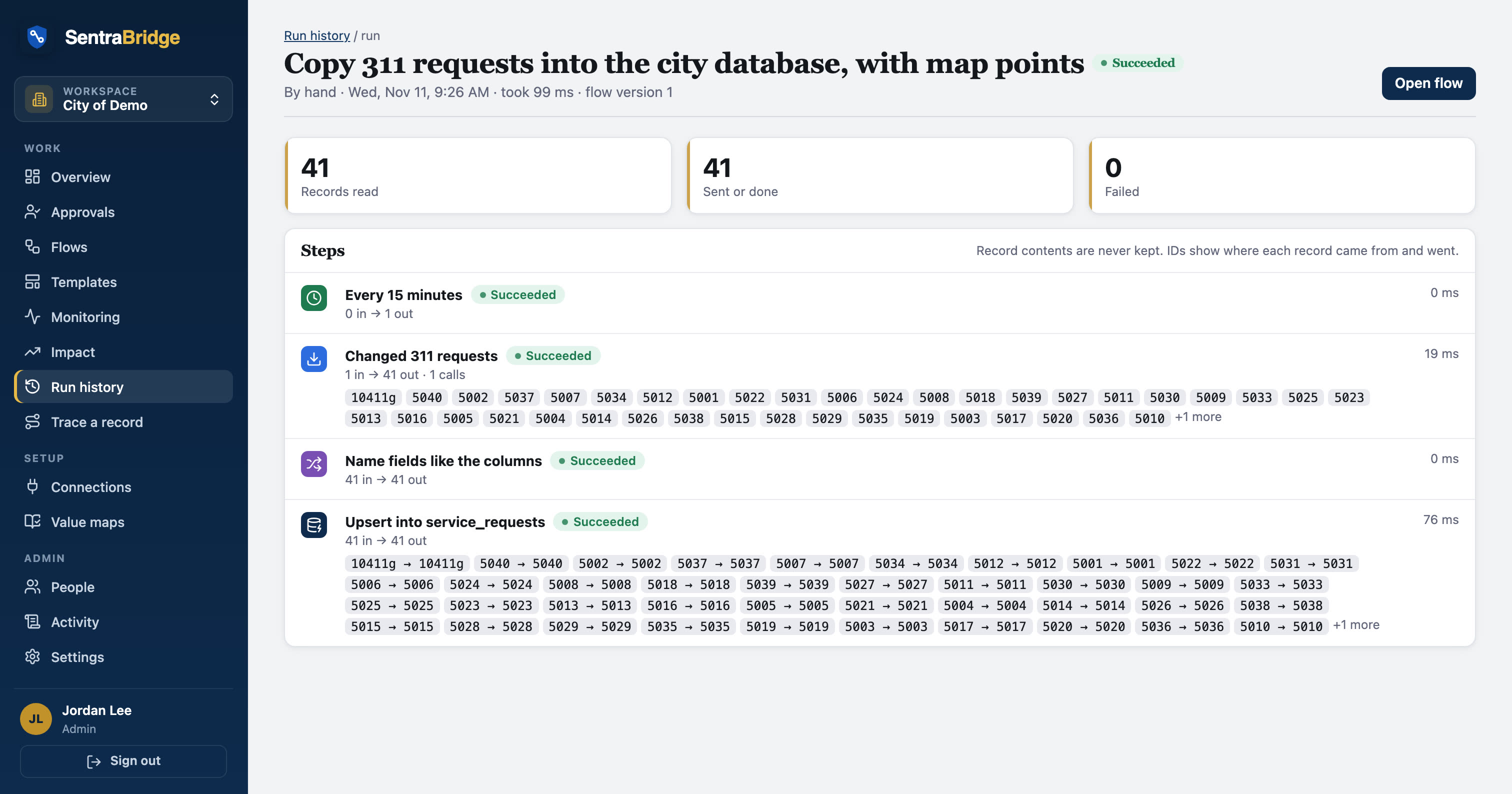
You don't need the contents to trace a record. You need its identifiers and the facts about each run:
- Which flow ran, and when.
- Which step handled the record.
- The record's ID on the source side, and the new ID on the destination side.
- Whether it succeeded, and if not, the error, with personal details masked.
With that, you can follow a record from system to system. The contents stay where they belong: in the source and destination systems, which are already the systems of record.
- 01Search an IDAny system's ID
- 02Every runThat touched it
- 03Each stepIn or out, and when
- 04Destination IDsWhere it landed
- 05ReplayRe-read by ID if failed
What a trace looks like
Search for a 311 request number and you might see:
- Mon 08:15 311 triage flow: read from Sentra 311, passed checks, routed as crew work.
- Mon 08:15 Created Scheduler visit, new ID returned.
- Mon 08:15 Upserted into the city database copy.
- Mon 08:30 311 triage flow: changed (closed), updated the database copy.
Each line links to its run, with counts and timings. Not one line contains the resident's name or description.
Fixing what failed, without a stored copy
Lineage also changes how you fix failures. If a record failed to reach the destination, the obvious fix is to re-send the copy from the log. Without a copy, you do something better: read the record again from the source, by its ID, and send the current version.
That's usually what you want anyway. If staff corrected the address after the failure, the replay sends the corrected one.
The public-records angle
Public-records rules vary by state, so check with your counsel. But the general point holds: a system that keeps only IDs, counts and timings holds much less that could be responsive, and much less personal information to redact. The integration's records become metadata about how records moved, not a second copy of them.
How long to keep the trail
Even metadata shouldn't live forever. Match how long you keep run history to how far back people actually ask, and to your records schedule for system logs. SentraBridge keeps run history for 90 days by default, which covers most "where is my request?" calls, and lets you set a longer period or a legal hold when your schedule requires it.
What to ask of any integration tool
- Can I search one record ID and see every flow it went through?
- Do run logs keep record contents, or only IDs and metadata?
- How long is run history kept?
- Can I replay a failed record without re-running everything?
- Is there an activity log of who changed which flow, and when?
In SentraBridge
SentraBridge is pass-through: records are held in memory during a run and never stored. Run history keeps counts, timings and record IDs, with errors redacted. Trace a record lets you search a record ID and see every flow it went through, and replay reads failed records again from the source by ID. See monitoring and lineage and security.