
Know what ran.
Fix what didn't.
Run history, failure alerts, replay by record ID, a monitoring dashboard, record lineage, flow version history and an activity log. All of it without keeping a copy of the records.
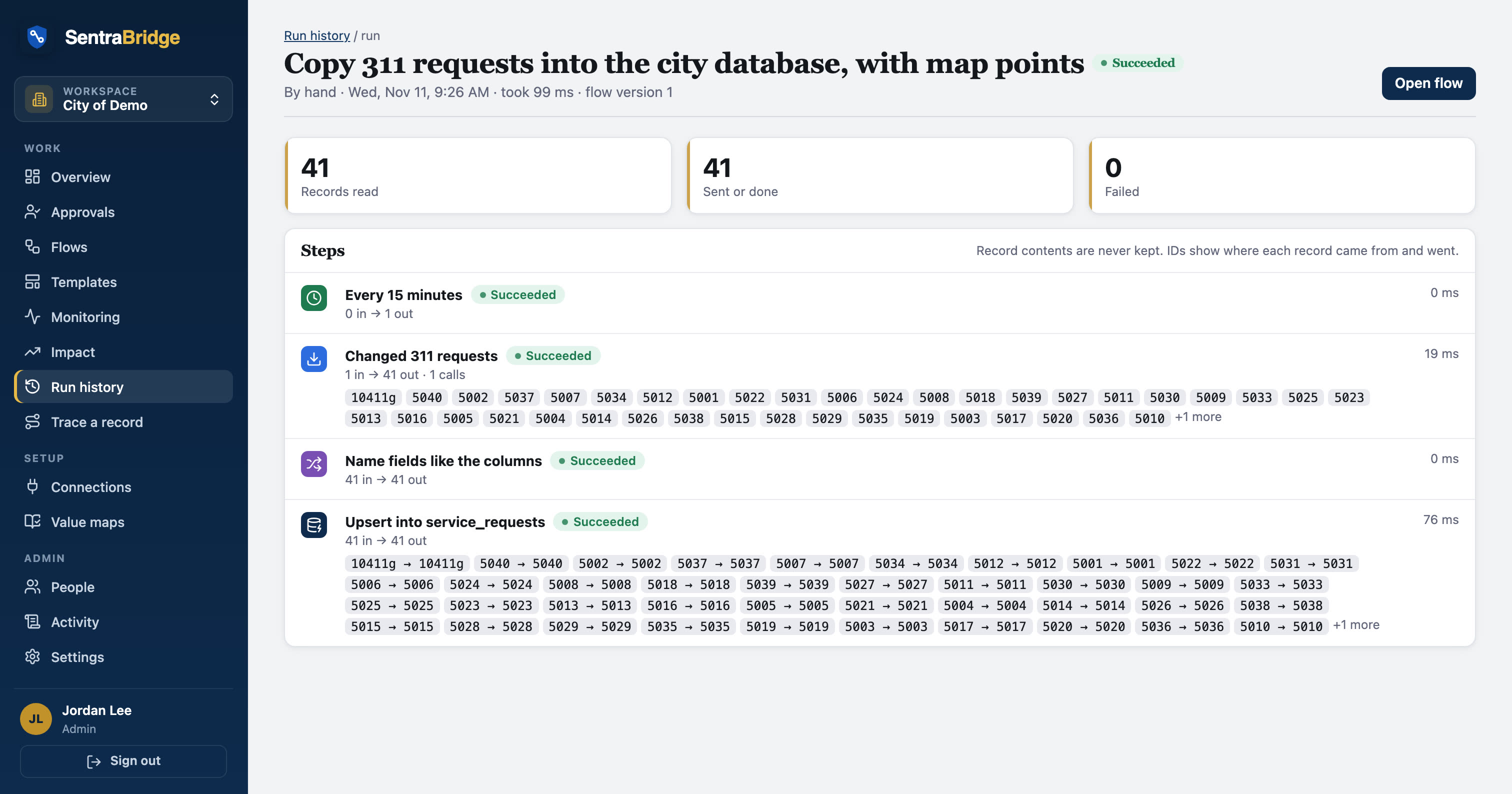
Counts, timings and IDs. Not contents.
Every run keeps when it ran, each step's record counts and timing, the IDs on each side, HTTP status and error text with emails and phone numbers masked. Run history is kept for 90 days unless you choose another period (7 days to 10 years), and a legal hold stops removal.
- Retries for busy or briefly unavailable systems (429 and 5xx)
- Failure alert emails link to the run
- A failure only stops its own downstream steps
| Subject | Failed: Bank payments (run 2291) |
| Flow | Load the bank's daily payment file into the city database |
| What failed | Write to database · 3 of 412 rows · “Amount out of range” |
| Record IDs | R-55012 R-55019 R-55033 |
| Next | Open the run · Replay failed records |
Fix the cause, then replay.
Replay doesn't re-send a stored copy, because there isn't one. It reads the failed records again from the source by ID and runs them through the flow, so the replay uses current data.
- Replay one record or every failure in a run
- If the source is down, the run fails and retries later
- Nothing is queued with data in it
| when | flow | path | result |
|---|---|---|---|
Mon 7:15 | 311 triage | Read → Clean and check → New request? → Create Scheduler visit | sent |
Mon 7:15 | 311 triage | Update the database copy | upserted |
Tue 2:00 | Nightly CSV to SFTP | Write CSV · requests-2026-11-10.csv | written |
Wed 7:00 | Operations digest | Combine → Count by source → Email | counted |
Runs, failure rates, slow steps.
The monitoring view shows runs over time, failure rates by flow, the slowest steps and connections that need attention, such as an expired sign-in. Each client can also have a public status page.
- Unhealthy connections surfaced before the next run
- Per-client status page
- Activity log: who changed which flow, connection or setting
| Accela connection: sign-in expired |
| Slowest step: Look up parcel (4.2 s) |
| 3 failed records ready to replay |
Where did this record go? Who changed this flow?
Trace a record: search a record ID and see every flow and step it went through, and what happened. Every saved change to a flow is a version you can compare with another or restore.
- Lineage from IDs only
- Compare any two versions
- Restore with one click
Know when the data looks wrong, not just when a run fails.
A run can succeed and still be wrong. Alert when a flow reads no records, when volume jumps or drops against recent runs, when a scheduled run is late, when nothing has succeeded for hours, or when failures climb. Each problem alerts once and says when it clears.
- Email, Teams, Slack, PagerDuty or a webhook
- Late runs worked out from the schedule
- Issues shown on Monitoring and the flow list
| Subject | Failed: Bank payments (run 2291) |
| Flow | Load the bank's daily payment file into the city database |
| What failed | Write to database · 3 of 412 rows · “Amount out of range” |
| Record IDs | R-55012 R-55019 R-55033 |
| Next | Open the run · Replay failed records |
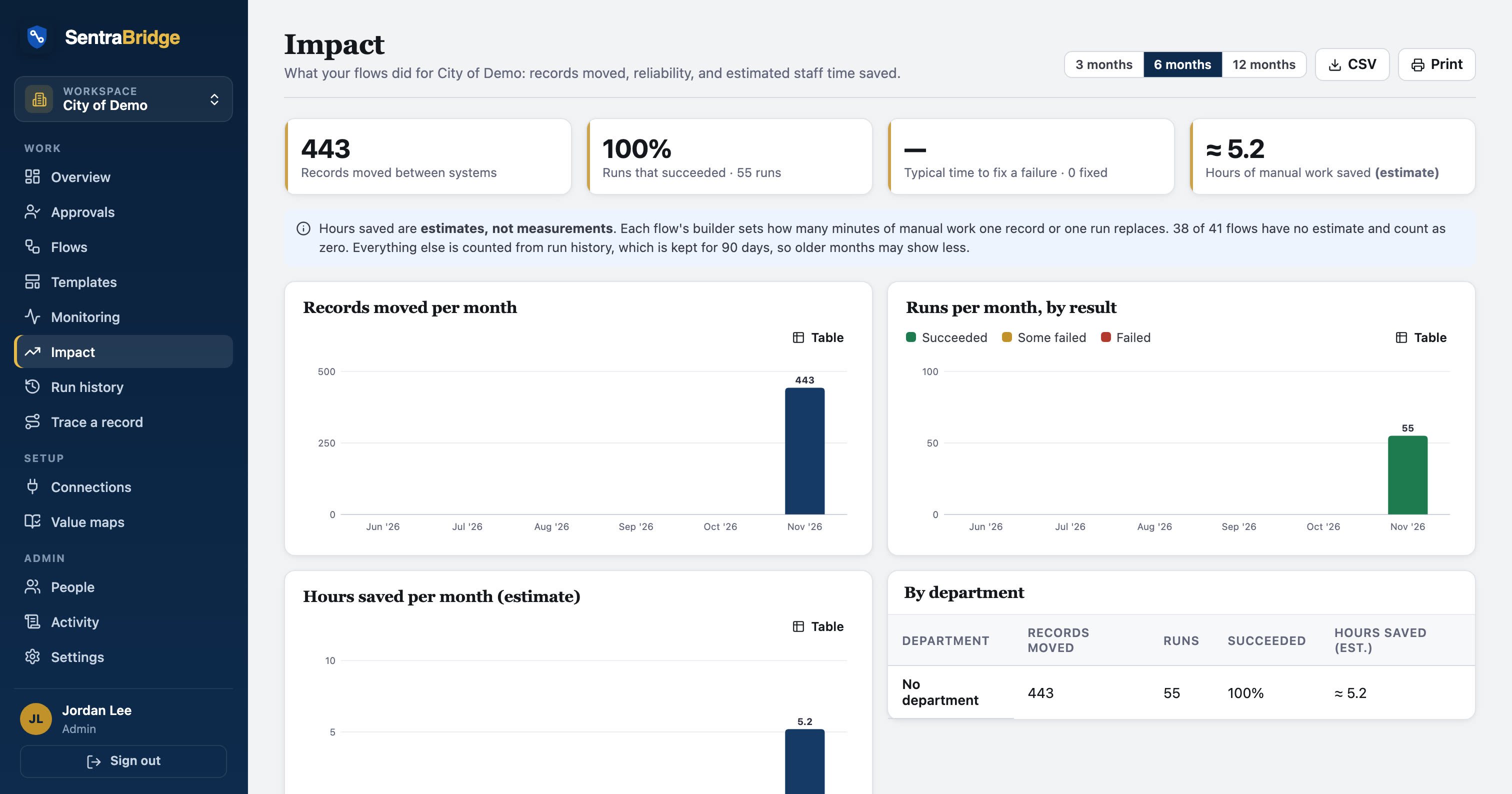
What the flows did, for the people who fund them.
A monthly view for city managers and department heads: records moved, success rate, how fast failures were fixed, and estimated staff hours saved, by department. Hours saved come from each flow's own estimate and are always labelled as estimates.
- Print, CSV, or a monthly email
- By month and by department
- Counts only, never records
See it in real flows.
Morning operations digest from three systems
Weekdays at 7 am, reads 311 requests, SentraQueue lobby visits and database work orders, puts them in one shape, combines and sorts them, emails a…
Sentra 311Weekly 311 summary for department heads
Every Monday at 7 am, counts last week's closed 311 requests by type and emails the summary.
Questions, answered
How long is history kept?
90 days unless an admin chooses 7 days to 10 years, with legal hold when needed. It never contains record contents.
Can we find every system a resident's request touched?
Yes. Trace a record by its ID to see every flow and step it passed through, with outcomes and times.
See your own systems connected.
We'll set up a workspace with your systems in a sandbox and build your first flow with you.